
Welcome to the Genesis-ds webmail service
Roundcube

To set up “out of office” messages go to “Settings”, then the “filter” tab. You can then add a new filter using the “+” buttons at the bottom of the columns.
Logging in
You will need your username and password to check your mail. If you are unsure about them, or whether your account is suitable for webmail use then please email support@genesis-ds.com and we will assist.
Addresses
The first time you log in, you will be asked to enter your name and email address. You can then change this using the Settings -> Identities section. Click on the identity to edit your details, or click the “+” to add an extra identity.
Spam Filtering Rules
Our servers automatically “tag” incoming emails if we think they are “spam”. You can set up a filter through the webmail to delete these before they get to your computer.
To do this, log in and click “Filters”, then “add”. Set the filter up as follows 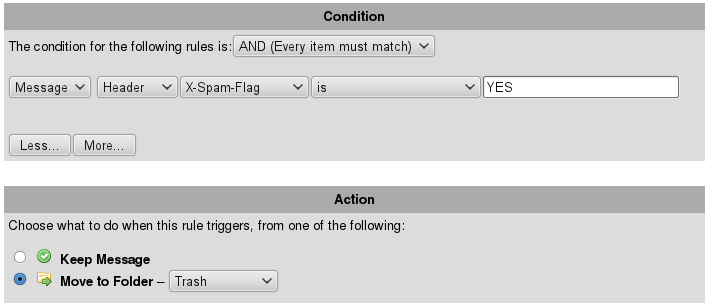 The messages will be kept in your “Trash” folder for 3 months – you can check this periodically before they are deleted permanently.
“Out Of Office”/Vacation autoreply messages
To set a “Vacation Message” or “Out Of Office” autoreply for your account when you have logged in, again, click filters at the top, then configure the settings as follows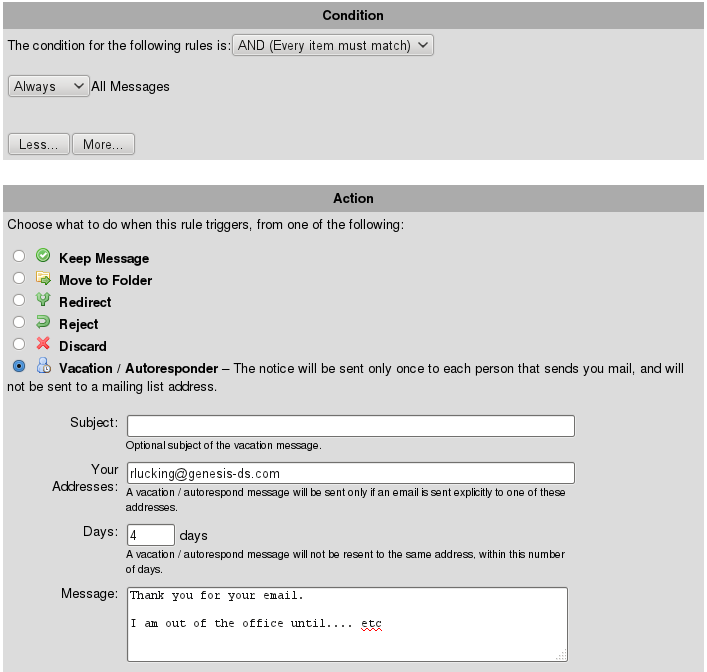 The “address” is important, as only messages to this address will be responded to. Enter the message, and click “apply”.
When you return, rather than deleting the message you can just edit it and tick “disable” it until you need it again.